

How to Play Free Fire for Beginners – Complete Guide 2026
So you just downloaded Free Fire and have no idea what’s going on?
You land on the island, someone shoots you in 10 seconds, and the screen goes red. Game over.
Don’t worry. Every pro player you see today was once exactly where you are right now. Lost, confused, and dying too fast.
This guide is for complete beginners. No complicated terms. No jargon. Just simple, honest steps that will take you from zero to your first Booyah (that’s what Free Fire calls a win).
Let’s go. 🔥
What Is Free Fire? (30-Second Explanation)
Free Fire is a Battle Royale game on mobile. Here’s how it works:
- 50 players drop onto one island
- Everyone fights to survive
- The last person (or team) alive wins
- The safe zone keeps shrinking — if you stay outside, you die
That’s it. Simple concept. Hard to master. But incredibly fun once you get it.
Step 1: Download and Set Up Free Fire
On Android: Go to Google Play Store → Search “Free Fire MAX” → Install
On iOS: Go to App Store → Search “Garena Free Fire” → Install
Once installed:
- Create your account (use Facebook or Google — do NOT use Guest, you may lose your account later)
- Pick your region — choose India or the region closest to you for better ping (lower ping = less lag)
- Choose your username — pick something cool, you can always change it later
💡 Free Fire Nation Tip: Create your account with Facebook or Google from day one. Guest accounts get deleted and cannot be recovered. We have seen hundreds of players lose their accounts this way.
Step 2: Understand the Game Screen
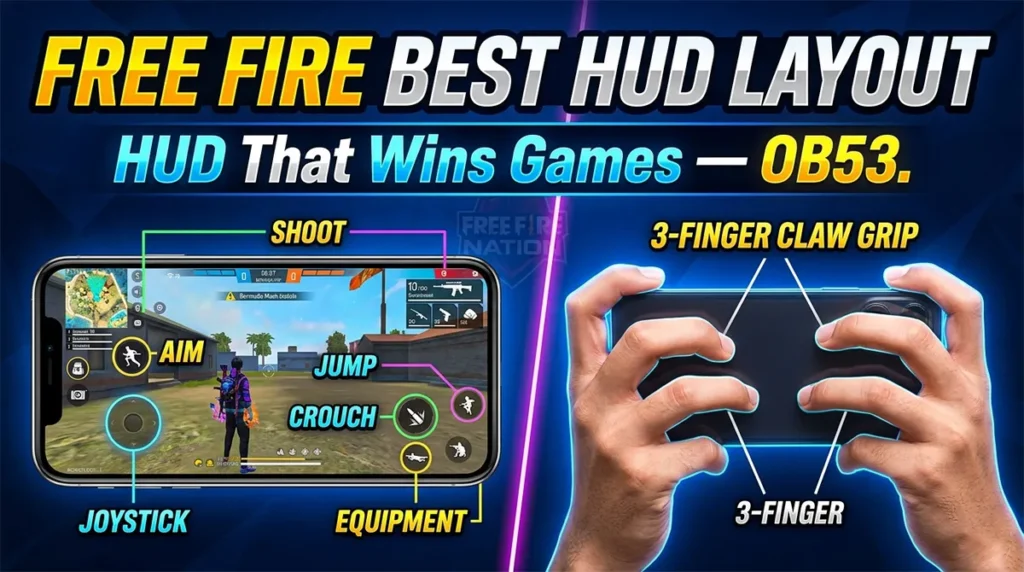
When you open a match for the first time, the screen looks confusing. Here is what everything means:
Top Left: Your health bar (red = health, yellow = armour)
Top Right: Your current weapon and ammo count
Bottom Left: Movement joystick — drag this to walk/run
Bottom Right: Action buttons — jump, crouch, shoot, aim, reload
Mini Map (Top Left corner): Shows the safe zone and where you are on the island
Timer (Top): Countdown to when the safe zone starts shrinking
Take 5 minutes in the Training Mode first (available in the main menu). You can practice shooting, moving, and using items with zero pressure. No one can kill you there.
Step 3: How to Land Properly
This is where most beginners go wrong. They land in the busiest spot and die in 30 seconds.
How the drop works:
- You start in a plane flying across the map
- Jump out whenever you want
- Use your character to glide down
- Land, grab a gun, survive
Where should beginners land?
❌ Avoid: Pochinok, Rim Nam Village, Peak — these are hot drop zones where experienced players land and kill everyone immediately
✅ Go to: Edges of the map, small towns with fewer players — you get time to loot and learn the game without getting eliminated instantly
Pro tip: Watch the plane route before jumping. Most players follow the center path. Land at the far end of the route — fewer enemies, more time to loot.
Step 4: What to Pick Up First (Looting)
When you land, you need to grab items as fast as possible. Here is the priority order for beginners:
Priority 1 — Gun 🔫
Pick up ANY gun first. Even a pistol is better than no weapon. You are completely helpless without one.
Priority 2 — Ammo 📦
A gun without bullets is useless. Always pick up ammo that matches your gun type:
- AR (Assault Rifle): Uses 5.56mm or 7.62mm bullets
- Shotgun: Uses 12 Gauge
- Sniper: Uses .50 ACP or 7.62mm
- SMG: Uses 9mm
Priority 3 — Armour (Vest + Helmet) 🛡️
These reduce the damage you take. Always equip the highest level you find.
- Level 1 (White) → Level 2 (Blue) → Level 3 (Gold) — Higher is better
Priority 4 — Medkits and Bandages 💊
You will get hurt. Always carry at least 2–3 medkits to heal yourself.
Priority 5 — Backpack 🎒
Bigger backpack = carry more items. Always upgrade your backpack when you find a better one.
💡 Free Fire Nation Tip: Don’t pick up everything you see. Focus on guns, ammo, armour, and medkits. Ignore throwables (grenades, smokes) until you are comfortable with the basics.
Step 5: How to Move Around Safely

Movement in Free Fire is not just about walking. Good movement keeps you alive.
Always be moving — standing still makes you an easy target
Crouch while shooting — press the crouch button when you fire. It makes you harder to hit and improves your accuracy
Use cover — trees, walls, rocks, and buildings are your friends. Always fight from behind cover, never in the open
Check your map constantly — the blue circle is the safe zone. If you are outside it, you are losing health every second. Keep moving toward the white circle (the next safe zone)
Use headphones — footsteps tell you where enemies are before you can see them. This is a massive advantage
Step 6: How to Fight (Combat Basics)
Here is the honest truth: your first 20–30 matches, you will die a lot. That is completely normal.
Basic combat tips:
Aim for the head — headshots deal 2x damage. You eliminate enemies much faster. Tap the head area before firing.
Crouch and shoot — your bullets become more accurate when you are crouched or prone (lying flat)
Don’t spray bullets — tap or burst fire instead of holding the trigger. Spraying makes bullets go everywhere except where you want.
Use the Aim button — press the scope/aim button before shooting for better accuracy, especially at medium range
Reload after every fight — always reload right after an encounter. The worst feeling is starting a new fight with 3 bullets left.
Don’t chase enemies blindly — if someone runs behind a building, they may have backup or a trap waiting. Be patient.
Step 7: Understanding the Safe Zone
This confuses every beginner, so let us explain it clearly.
The safe zone is the white circle on your map. You must stay inside it.
Every few minutes, the safe zone shrinks. A blue danger zone closes in. If you are caught in the blue zone, your health decreases slowly — and fast toward the end of the match.
Simple rule: Always know where the next safe zone is. Keep one eye on the timer. Never get caught outside.
As the game goes on, the zone gets smaller and smaller. Fewer players are alive. The last zone is tiny — this is when the final battles happen. Stay low, use cover, and pick your fights wisely.
Step 8: Characters and Their Abilities

Free Fire has unique characters — each one has a special ability that helps in battle.
As a beginner, you start with the default character. But here are the most beginner-friendly characters to unlock first:
| Character | Ability | Why It Helps Beginners |
|---|---|---|
| DJ Alok | Creates a healing aura around you | Heals you mid-fight — very forgiving for new players |
| Kelly | Increases sprint speed | Run faster to the safe zone |
| Nikita | Faster reload for SMGs | Great if you like close combat |
| Miguel | Recovers EP after kills | Rewards you for getting eliminations |
You do not need to buy characters to enjoy the game. Learn the mechanics first. Characters come naturally over time.
Step 9: Game Modes for Beginners
Free Fire has multiple game modes. Here is which ones beginners should start with:
🎯 Training Mode — Start here. Practice shooting, movement, and controls with zero risk. No enemies. Essential for day one.
👥 Squad Mode (Recommended for Beginners) — Play with 3 friends or random teammates. If you die, your teammates can revive you. Much more forgiving than solo. You learn from watching your teammates too.
🤝 Duo Mode — Play with one partner. Good once you are slightly comfortable.
🧍 Solo Mode — Just you vs 49 other players. Only try this after you understand the basics. No one to save you here.
Step 10: Common Beginner Mistakes to Avoid
We have seen thousands of new players make the same mistakes. Here is what NOT to do:
❌ Landing in hot drop zones — You will die in 15 seconds. Land at the edge first.
❌ Running in the open — Always use cover. The open field is where players get eliminated.
❌ Ignoring the safe zone — Getting caught outside the zone in the final circle is one of the most common ways beginners lose.
❌ Using Guest account — Please. Create a proper account. We cannot stress this enough.
❌ Panicking in fights — Take a breath. Crouch. Find cover. Fights are won by calm, not speed.
❌ Playing with bad settings — The default sensitivity is usually too high or too low for most players. Adjust your sensitivity in settings before playing (we have a full sensitivity guide on Free Fire Nation).
❌ Giving up after losing — Everyone loses their first 20 games. The learning curve is steep but short.
Beginner Settings You Should Change Right Now
Before your next match, go to Settings and change these:
Sensitivity:
- If your aim feels shaky and moves too fast → lower sensitivity
- If your aim feels slow and heavy → increase sensitivity
- Use our Free Fire Sensitivity Calculator to find the perfect settings for your phone
Auto Pickup: Turn ON auto-pickup for ammo and medkits so you don’t have to manually tap everything
Graphics: Set to your phone’s best stable setting. If you face lag, drop it down. Smooth gameplay beats beautiful graphics every time.
Audio: Turn game sound ON and use headphones. Footstep sounds are incredibly important for survival.
Your First Booyah — What It Feels Like
The first time you win a Free Fire match, you will not forget it.
The screen lights up. “BOOYAH!” appears in massive letters. Your character celebrates. Your heart is racing.
It might take 10 matches. It might take 50. But every player eventually gets that first Booyah — and after that, you will be completely hooked.
Start with squad mode. Stick with your team. Play safe. Learn one thing each match. And slowly, you will get there.
Good luck, Survivor. The island is waiting. 🏝️🔥
Quick Recap — Beginner’s Checklist
✅ Download Free Fire MAX and create a proper account (not Guest) ✅ Spend 10 minutes in Training Mode before your first real match ✅ Land away from hot drop zones ✅ Pick up: Gun → Ammo → Armour → Medkits → Backpack (in that order) ✅ Always stay inside the safe zone ✅ Crouch while shooting ✅ Play Squad mode first — teammates can revive you ✅ Use headphones for footstep awareness ✅ Adjust sensitivity before playing ✅ Don’t give up after losing — losing is learning
Frequently Asked Questions
Q: Is Free Fire free to play? A: Yes, Free Fire is completely free to download and play. Diamonds (premium currency) are optional and only needed for cosmetic items.
Q: How long does one Free Fire match take? A: A typical match lasts about 10–15 minutes. That’s one of the reasons it’s so popular — quick games you can play anywhere.
Q: Which phone do I need to play Free Fire? A: Free Fire is designed for low-end phones. You need at least 1GB RAM and Android 4.0.3 or higher. It runs on most budget Android phones in India.
Q: What is the best character for beginners? A: DJ Alok is the best beginner character because his healing ability helps you survive fights. But the default character is perfectly fine for learning the game.
Q: Can I play Free Fire solo or do I need a team? A: Both options exist. But beginners should start with squad mode — if you die, teammates can revive you, giving you more time to learn.
Q: Is Free Fire available in India? A: Free Fire MAX is available in India on the Google Play Store and App Store.
Also read on Free Fire Nation:
- Free Fire Best Sensitivity Settings – Find Your Perfect Setup
- How to Get Free Diamonds in Free Fire
- Best Free Fire Characters 2026 – Full Tier List