
How to Recover a Banned Free Fire Account in 2026 — The Only Guide You Need
Opening Free Fire to a red suspension screen is one of the worst feelings in mobile gaming. Everything — your diamonds, skins, ranked progress, characters — locked behind a ban message that gives you almost no useful information about what happened or what to do next.
Most players make three costly mistakes in the first ten minutes: they spam multiple support tickets (which pushes them to the back of the queue), they try “unban APKs” from YouTube (which steal their login data), or they appeal a confirmed permanent ban with an emotional message that gets auto-closed instantly. This guide is built to stop all three.
Before anything else — your ban type determines your entire recovery path how to Unban Free Fire Account
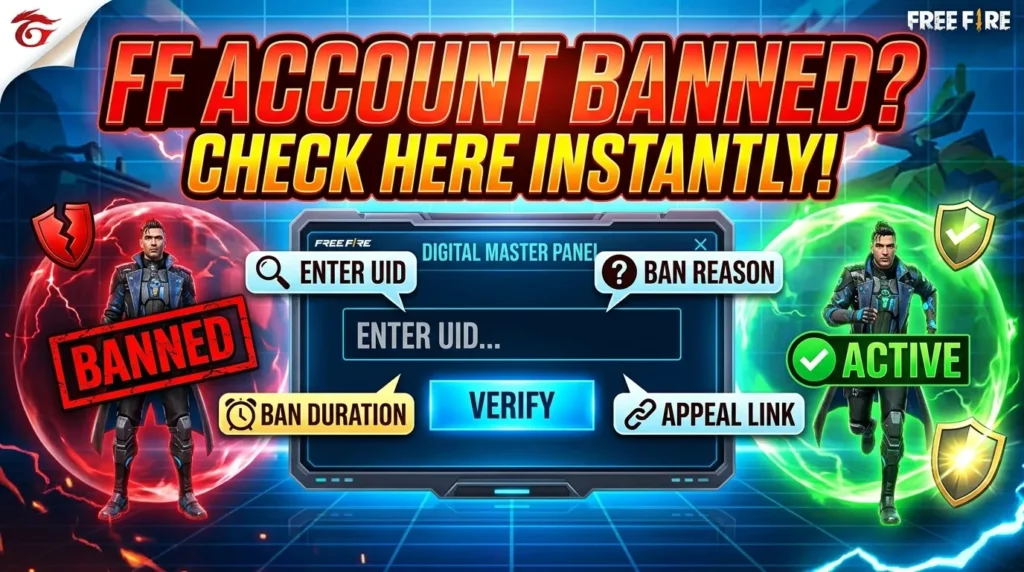
Step 1: Identify What Type of Ban You Actually Have
Not all Free Fire bans work the same way, and the recovery process is completely different depending on which type you received. There are three distinct situations, and mixing up your path wastes days.
Temporary ban: Your account is suspended for a fixed duration — anywhere from 24 hours to 30 days. You’ll usually see a message that includes how long the ban lasts. These are issued for lesser violations: playing with flagged teammates, unusual login activity, payment disputes, or low-confidence anti-cheat flags. Temporary bans lift automatically when the timer expires. In most cases, you don’t need to do anything.
False positive / wrongful ban: Your account shows as suspended but you genuinely didn’t violate any rules. This happens more than Garena publicly acknowledges — especially since stricter anti-cheat measures rolled out for Free Fire India, which introduced false positive flags from gaming tools, phone optimizers, and performance apps being mistaken for modification software. These bans are fully appealable and do get reversed with the right evidence.
Confirmed permanent ban: Garena’s system detected confirmed cheating — aimbots, wallhacks, mod APKs, config files, or repeated violations after prior warnings. Garena’s own official policy states clearly: first-time permanent bans for confirmed cheating carry no appeal option. The account is gone.
Pro Tip: Use the Free Fire Ban Checker tool on FreeFireNation to confirm your ban status first. It pulls directly from Garena’s API and shows your exact account state before you spend time building an appeal for a ban that won’t move.

Path A: Temporary Ban — What to Do While You Wait
If your ban screen shows a specific duration, you’re in the most straightforward situation. The account will unlock automatically when the timer runs out. No appeal needed. No support ticket required.
What you should do during the wait:
- Check the email linked to your Free Fire account. Garena sometimes sends a notification explaining the specific reason.
- Do NOT log in repeatedly trying to bypass it — repeated failed login attempts can extend review periods.
- Do NOT submit a support ticket for a temporary ban that’s still active. Garena’s support volume is enormous, and submitting tickets for time-limited bans that resolve on their own just slows down actual case reviews for others and can flag your account as a problem case.
Common Mistake: Players with 3-day or 7-day bans file appeals immediately, get no response in that window (because Garena’s average review time is 3–5 business days), assume the appeal worked, and then don’t understand why the ban lifted on its own schedule. The two events are unrelated. Your patience did the work, not the ticket.
Once the ban lifts, immediately do two things: enable two-factor authentication on the Google or Facebook account linked to Free Fire, and check whether any third-party apps on your device might have triggered the flag. Common culprits are phone cleaner apps, RAM boosters, and performance optimizers that touch game processes.
Path B: False Positive Ban — How to Build an Appeal That Gets Reviewed
This is where most legitimate unban guides fall short. They tell you to “contact Garena support” without explaining what a reviewable appeal actually looks like versus one that gets auto-closed in 30 seconds.
Garena’s support team handles tens of thousands of tickets. An appeal that says “I didn’t hack, please unban my account” gets closed immediately — not because the agent is heartless, but because there’s nothing to investigate without evidence. Every single appeal they can act on contains specific, verifiable information that gives them a reason to pull and manually review your case.
Evidence to gather before you submit anything:
- Screenshot of the exact ban message (the full screen, not cropped)
- Your Free Fire UID — find it via the Free Fire Player Info Tool if you can’t access the game
- Purchase receipts from Google Play or Apple App Store showing diamond top-ups on the account (this proves ownership and investment — Garena takes it seriously)
- Your device’s Google Play Protect scan result showing no harmful apps detected
- If you were using an emulator: specify which one (BlueStacks official, LDPlayer), the version number, and confirm it was a non-rooted installation
- If you use a VPN for any reason: state this upfront, name the provider, and explain why
Quick Note: False positive bans in 2026 have particularly affected players in India using phone optimization apps and game boosters. If you have any of these installed — Samsung Game Booster, Phone Master, DU Speed Booster, or similar — uninstall them before your appeal and mention that you’ve done so. Garena’s anti-cheat system has flagged these in multiple documented cases.
How to submit the appeal:
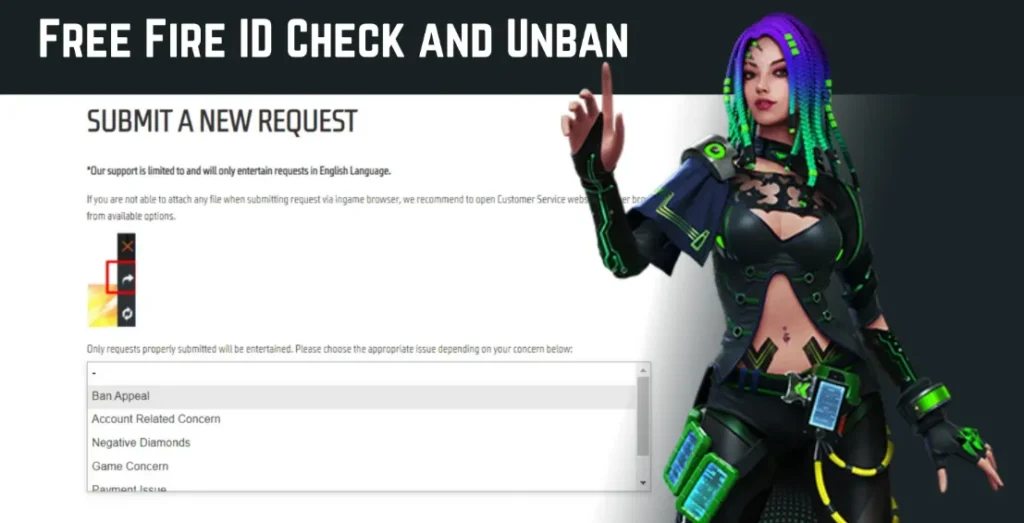
- Go to Garena’s official support portal: ffsupport.garena.com
- Click “Sign In” and log in with the same account linked to your banned Free Fire ID (Facebook, Google, or VK)
- Select “Submit a Request”
- Choose “Ban Appeal” as the request type
- Fill in your UID, nickname, and server region accurately — a wrong region causes immediate rejection
- In the description box, paste your appeal (see the template below)
- Attach your ban screenshot and any supporting evidence
- Hit Submit — then stop. Do not submit again.
One ticket only. Submitting duplicates doesn’t speed up your review — it resets your position in the queue and can flag the case as spam.
The Ban Appeal Template — Copy, Edit, and Use This
This is what a reviewable appeal looks like. Edit the bracketed sections with your real details before submitting.
Subject: Ban Appeal — Free Fire Account UID [YOUR UID]
Dear Garena Support Team,
I am writing to appeal the suspension of my Free Fire account (UID: [YOUR UID], Nickname: [YOUR NICKNAME], Server: [India / Singapore / Brazil]).
My account was suspended on [DATE]. I have not used any hacks, third-party tools, modified APKs, or unauthorized software at any point. I believe this ban may have been triggered by [briefly state the most likely cause — e.g., “a phone optimization app (Samsung Game Booster) that was running in the background during gameplay” / “logging in from a different device than usual” / “using an official emulator (BlueStacks 5, non-rooted)”]
I have attached: — Screenshot of the ban notice — Google Play Protect scan showing no harmful applications detected — Purchase receipts confirming my account ownership [if available]
I respectfully request a manual review of my account activity and match logs. I have played Free Fire since [approximate year] and have invested significantly in this account. I am happy to provide any additional information needed.
Thank you for your time. [YOUR NAME / NICKNAME] UID: [YOUR UID]
Keep it under 1,000 characters in the actual form description field — Garena’s system has a limit and agents process faster when appeals are concise. Attach evidence separately as files, not pasted into the text box.
Path C: Confirmed Permanent Ban — The Honest Answer
If Garena’s system detected confirmed cheating — and you know the account was used to run hacks, mod menus, config files, or any third-party tool — the honest answer is that the account is not coming back.
Garena’s own official statement on first-time permanent bans for confirmed cheating is that no appeal will be entertained. This is a hardcoded policy, not a case-by-case decision. Support agents cannot override it regardless of how many diamonds were spent, how long the account existed, or how sincere the appeal reads.
Submitting appeals for confirmed permanent bans isn’t just futile — it can trigger a device ID ban if you keep logging into the banned account trying to test whether the appeal worked. A device ban blocks every account on that phone, not just the original one. Stop logging in immediately if you receive a confirmed cheat ban.
The realistic path forward is starting a new account on a different device if you have a device ban, or on the same device if only the account was banned. Before you do: understand exactly which action triggered the original ban so you don’t repeat it. The Free Fire account safety guide on FreeFireNation covers every confirmed ban trigger based on Garena’s official terms of service.
Scam Warning: Tools and Services That Will Make Things Worse
This section exists because thousands of players lose their login credentials every month to scams that target exactly the moment of panic that follows a ban screen.
Unban APKs and mod files: YouTube is full of videos claiming an APK file can lift a ban. They can’t. Garena’s ban system lives on their servers — no file on your phone touches it. These APKs either install malware, steal stored Facebook login tokens from your device, or both.
“Unban services” that charge fees: Websites and Telegram channels offering to unban accounts for 200–500 rupees are taking your money and doing nothing. Some go further and ask for your Facebook or Google login to “submit the appeal on your behalf” — at which point they have full access to your account and linked payment methods.
VPN bypass claims: VPNs change your IP address. Garena’s ban is tied to your UID, which is a database entry on their servers. Changing your IP does nothing. Using a VPN to try to bypass a ban while still logging into the same account just adds a suspicious activity flag to your case.
Multiple-account workarounds on the same device: If you received an account ban (not a device ban), creating a new account on the same phone is technically possible. But playing on any account while a ban investigation is active on the same device carries risk of the device being flagged.
The only entity that can lift a Free Fire ban is Garena. The only channel that can do it is ffsupport.garena.com. Everything else is noise.
How to Protect Your Next Account From Day One
Whether your ban gets reversed or you’re starting fresh, these are the habits that keep accounts safe long term.
Link your account to both Google and Facebook immediately — not just one. If one platform gets compromised, you still have a recovery path. Screenshot your UID and save it somewhere offline. Garena support will ask for it, and players locked out of their accounts often can’t retrieve it. You can also check any UID using the Free Fire Player Info Tool before you lose access.
Avoid third-party apps that touch game processes — phone boosters, RAM cleaners, performance optimizers. The 2026 anti-cheat update specifically increased sensitivity to software that interacts with game memory, even apps that have no cheating function whatsoever.
Enable Google Play Protect and run a scan monthly. If a scan ever shows a flag, resolve it before your next gaming session.
Never share your account login with anyone — not a friend, not a guild leader, not a boosting service. Account sharing is itself a Terms of Service violation, and if the person you shared with gets flagged, your account takes the ban.
Create Nicknames for Free Fire
Free Fire Nickname Generator – with this tool you can Create Nicknames for Free Fire In the fast-paced…

Free fire invisible space copy paste (ㅤ)
Free Fire Invisible Space Generator (2026 Updated) – Get Blank Names That Work What is Free Fire Invisible…
Free Fire Account Age Checker
Free Fire Account Age Checker Free Fire is one of the most popular battle royale games in the…
The Takeaway
The players who successfully recover wrongful bans all do the same thing: they figure out their exact ban type first, gather real evidence before opening a ticket, write a concise and specific appeal, submit it once, and wait. The players who fail either appeal the wrong ban type, submit five tickets in a panic, or waste a week on YouTube scams while their actual appeal window closes.
If you’re not sure whether your account is currently banned or just experiencing a login error, run a check with the Free Fire Ban Checker before you do anything else. It takes 10 seconds and tells you exactly what you’re dealing with.
Which type of ban did you receive? Drop your situation in the comments — the FreeFireNation community has seen most scenarios and can point you in the right direction.
Frequently Asked Questions
Can a permanently banned Free Fire account be recovered?
It depends entirely on the ban type. False positive permanent bans — where the system incorrectly flagged clean gameplay — can be reversed through the official appeal process with supporting evidence. Confirmed permanent bans for cheating (aimbots, mod APKs, config files) are not reversible. Garena’s official policy states no appeal will be entertained for confirmed first-time cheat bans.
How long does Garena take to respond to a ban appeal?
Garena’s average response time is 3 to 5 business days for standard cases. Complex cases involving manual match log review can take up to 14 days. Do not submit additional tickets during this period — duplicate submissions reset your queue position.
Does submitting multiple ban appeal tickets speed up the process?
No — it does the opposite. Multiple tickets flag your case as low-priority spam and can reset your place in the review queue. Submit one clear, detailed appeal with evidence attached, then wait for a response.
What is the official link to submit a Free Fire ban appeal?
The only legitimate appeal channel is Garena’s official support portal at ffsupport.garena.com. Log in with the platform linked to your banned account, select “Submit a Request,” and choose “Ban Appeal” as the request type. Any third-party website, APK, or service claiming to process appeals on your behalf is a scam.
Can a Free Fire device ban be appealed?
Yes, device bans can be appealed through the same ffsupport.garena.com portal, but they are significantly harder to reverse than account bans. Device bans occur when Garena detects repeated cheating attempts from the same hardware. If your device ban appeal is unsuccessful, a new account on a different device is the only functional workaround.

Written by
Free Fire Nation Team
Free Fire Nation is a dedicated gaming editorial team covering Free Fire news, weapon guides, esports, and redeem codes since 2019. All content is tested in-game and verified against official Garena sources.
Hello, dear Garena. My account was banned sometime in 2021 or 2022—honestly, I don’t remember exactly when or why. I’ve returned to the game after a long time away and am asking you to please unban me. It has been a long time, and I won’t use bugs or repeat whatever caused the ban. Please give me a second chance; this is my first ban across any of my accounts.
Hello, Team Garena Free Fire, With due respect and humble submission I would like to inform you that, My Id was Suspended When I was playing The Game, I Haven’t Done anything Wrong and I am Sure that I have followed your Rules of conduct, And I am also Sure that By Mistake you have suspended My Account for No Valid Reason, This is my Humble Request to Free Fire Team to Unban My Account. Player Name: Player UID: