

If you’ve been experiencing lag, high ping, or connection issues while playing Free Fire, you’re not alone. Many players turn to proxy servers as a solution to improve their gaming experience Free Fire Proxy Server Details. But what exactly is a Free Fire proxy server, and should you use one?
In this guide, we’ll break down everything you need to know about using proxy servers for Free Fire, including how they work, setup instructions, benefits, and important safety considerations.
What is a Free Fire Proxy Server?
A proxy server acts as a middleman between your device and the Free Fire game servers. Instead of connecting directly to Garena’s servers, your connection routes through the proxy server first.
Think of it like this: normally, your game data travels from your phone → your ISP → Free Fire servers. With a proxy, it goes: your phone → proxy server → Free Fire servers. This extra step might seem counterintuitive, but it can actually reduce lag in certain situations.
Why Do Players Use Proxy Servers for Free Fire?
Players use Free Fire proxy servers for several reasons:
Reducing Ping and Lag: If your ISP has poor routing to Free Fire servers, a proxy with better network paths can reduce your ping significantly. This is especially helpful for players in regions far from official game servers.
Bypassing Network Restrictions: Some schools, workplaces, or even countries block gaming traffic. A proxy can help you connect when direct access is restricted.
Accessing Different Server Regions: Want to play on a different regional server? Proxies can make it appear like you’re connecting from another location.
Improving Connection Stability: If you experience frequent disconnections, a stable proxy server might provide a more consistent connection to the game.
How Does a Proxy Server Reduce Lag in Free Fire?
The magic happens when the proxy server has better network infrastructure or more direct routes to Free Fire’s game servers than your regular internet connection.
Your ISP might route your connection through multiple hops across different networks before reaching the game server. A gaming-optimized proxy can take a more direct path, reducing the distance your data travels and cutting down response time.
However, not all proxies will improve your connection. A poorly located or overloaded proxy can actually make your lag worse. That’s why choosing the right proxy server is crucial for improving your Free Fire gameplay.
Types of Proxy Servers for Free Fire
HTTP/HTTPS Proxies

These are the most common types of proxies. They work well for web browsing but aren’t always ideal for gaming since they’re designed for web traffic rather than real-time game data.
SOCKS Proxies
SOCKS proxies (especially SOCKS5) are better suited for gaming because they handle all types of internet traffic, not just web browsing. They provide faster speeds and better compatibility with gaming applications.
VPN Services
While technically different from proxies, VPNs serve a similar purpose. Many players use gaming VPNs as an alternative to proxy servers. VPNs encrypt your connection and often provide better security, though they may introduce slightly more latency than a direct proxy.
Dedicated Gaming Proxies
These are proxy services specifically optimized for mobile gaming. They’re designed to reduce ping and prioritize gaming traffic, making them the best option for Free Fire players serious about competitive gameplay.
How to Setup a Proxy Server for Free Fire (Step-by-Step)
Setting up a proxy for Free Fire is relatively straightforward. Here’s how to do it on Android devices (the most common platform for Free Fire):
Method 1: Using Android WiFi Settings
Step 1: Open your phone’s Settings and go to WiFi settings.
Step 2: Long-press on your connected WiFi network and select “Modify Network” or “Network Settings.”
Step 3: Tap on “Advanced Options” to reveal additional settings.
Step 4: Find the “Proxy” dropdown menu and change it from “None” to “Manual.”
Step 5: Enter your proxy server details:
• Proxy hostname (the IP address of your proxy server)
• Proxy port (usually 8080, 3128, or provided by your proxy service)
• Bypass proxy for (leave blank or add specific addresses)
Step 6: Save your settings and reconnect to WiFi.
Step 7: Open Free Fire and test your connection. Check if your ping has improved in the game lobby.
Method 2: Using Third-Party Apps
Several Android apps can help you configure proxy settings more easily:
ProxyDroid: This app requires root access but gives you complete control over which apps use the proxy connection.
Drony: A non-root alternative that creates a VPN-like tunnel to route your traffic through a proxy server.
Every Proxy: User-friendly app that doesn’t require root and works well with mobile games like Free Fire.
After installing your chosen app, enter your proxy server details and enable the connection before launching Free Fire. Remember to test your ping to see if there’s improvement.
Finding the Best Free Fire Proxy Servers
Not all proxy servers are created equal. Here’s what to look for when choosing a proxy for Free Fire:
Location Matters
Choose a proxy server located close to Free Fire’s game servers for your region. If you play on Southeast Asian servers, use a proxy in Singapore, Thailand, or Indonesia. For European players, proxies in Germany or the Netherlands work well.
Speed and Bandwidth
Gaming requires fast, consistent speeds. Look for proxies that advertise low latency and unlimited bandwidth. Free proxies often have speed caps that make them unsuitable for real-time gaming.
Reliability and Uptime
Your proxy server needs to be online when you want to play. Premium proxy services typically offer 99%+ uptime guarantees, while free proxies may go down frequently.
Free vs. Paid Proxy Servers
Free Proxy Servers: While tempting, free proxies often come with serious drawbacks. They’re usually slow, unreliable, and may be overcrowded with users. Worse, some free proxies may log your data or even inject malware.
Paid Proxy Services: Premium gaming proxies cost money but offer better speeds, security, and customer support. Prices typically range from $5-$20 per month. Popular options include NordVPN, ExitLag, and WTFast (which are technically VPN services but serve the same purpose).
Benefits of Using a Proxy Server for Free Fire
1. Lower Ping and Reduced Lag
The primary benefit is improved connection quality. Players have reported ping reductions from 100ms+ down to 30-50ms when using optimal proxy servers, giving you a competitive edge in battles.
2. Access to Different Regions
Want to play with friends on different servers or participate in region-exclusive events? A proxy lets you connect to any Free Fire server regardless of your physical location.
3. Better Connection During Peak Hours
When your local network is congested, a proxy with better routing can provide more stable gameplay during peak gaming hours.
4. Protection from DDoS Attacks
For competitive players, proxies can hide your real IP address, making it harder for malicious players to launch DDoS attacks against you during tournaments.
5. Bypass ISP Throttling
Some internet providers throttle gaming traffic. A proxy can help bypass these restrictions by masking your gaming activity.
Risks and Drawbacks of Using Free Fire Proxy Servers
While proxies can improve your gaming experience, they also come with potential downsides you need to know about:
Account Security Risks
Using untrusted proxy servers means your game data passes through third-party servers. Malicious proxy operators could potentially intercept your login credentials or personal information. Only use reputable, well-reviewed proxy services.
Possible Account Ban
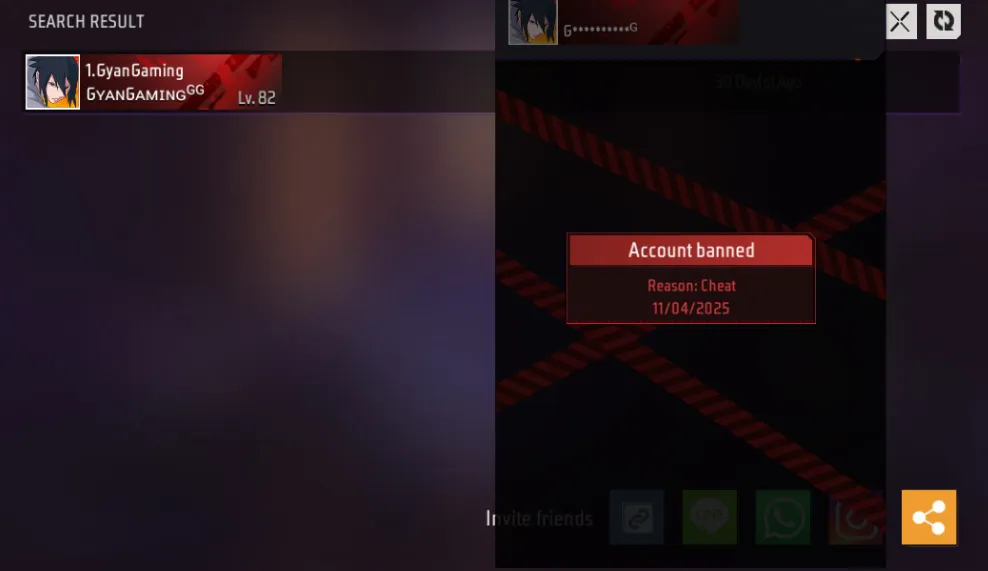
Garena’s terms of service prohibit certain types of connection manipulation. While using a proxy isn’t explicitly banned, connecting from unusual locations or switching regions frequently might trigger anti-cheat systems. Use proxies responsibly and avoid suspicious behavior.
Increased Lag (If Wrong Proxy)
A poorly chosen proxy can make your connection worse. If the proxy server is far from both you and the game servers, or if it’s overloaded, you’ll experience higher ping instead of lower.
Connection Instability
Free or low-quality proxy servers may disconnect frequently, ruining your gaming sessions and potentially resulting in penalties for leaving matches.
Privacy Concerns
Free proxy services often log your internet activity and may sell this data to third parties. If privacy matters to you, invest in a paid, no-log proxy or VPN service.
Tips for Using Proxy Servers Safely with Free Fire
If you decide to use a proxy server for Free Fire, follow these best practices to stay safe:
Research Before Choosing: Read reviews and check forums before selecting a proxy service. Look for feedback from other Free Fire players about connection quality and reliability.
Use Reputable Services: Stick with well-known proxy or VPN providers with transparent privacy policies. Avoid random free proxies found through search engines.
Test Your Connection: Before jumping into ranked matches, test your proxy connection in classic mode to ensure it’s actually improving your ping and stability.
Don’t Share Account Details: Never enter your Free Fire login credentials into proxy-related apps or websites. Your proxy should only handle network traffic, not account access.
Monitor Your Ping: Keep track of your in-game ping. If your proxy stops being effective or makes things worse, switch back to your direct connection.
Avoid Region Hopping: Don’t constantly switch between different regional servers using proxies, as this may appear suspicious to Garena’s security systems.
Alternatives to Proxy Servers for Reducing Free Fire Lag
If you’re hesitant about using proxies, there are other ways to improve your Free Fire connection:
Gaming VPN Services: Purpose-built gaming VPNs like ExitLag, WTFast, or NoPing are designed specifically for reducing gaming lag and are generally safer than random proxy servers.
Optimize Your Network: Close background apps, use a wired connection instead of WiFi (with an adapter), and ensure no one else is streaming or downloading on your network.
Change DNS Servers: Switching to faster DNS servers like Google DNS (8.8.8.8) or Cloudflare (1.1.1.1) can sometimes reduce latency.
Upgrade Your Internet Plan: If you’re on a slow connection, upgrading to a faster internet package might be the most straightforward solution.
Use Game Booster Apps: Apps designed to optimize your phone’s performance can reduce lag by freeing up RAM and reducing background processes. Just make sure these apps are improving your gameplay and not affecting your device negatively.
Does Free Fire Allow Proxy Servers?
This is a common question among players. Garena doesn’t explicitly prohibit proxy usage in their terms of service, but they do have rules against unfair advantages and connection manipulation.
Using a proxy simply to reduce lag and improve your connection is generally considered acceptable. However, using proxies to exploit region-locked content, bypass bans, or manipulate matchmaking could violate the terms of service and result in account suspension.
The key is using proxies responsibly and for legitimate purposes like reducing ping, not to gain unfair advantages or circumvent game rules.
Frequently Asked Questions About Free Fire Proxy Servers
Can a proxy server get me banned in Free Fire?
Using a proxy for legitimate purposes like reducing lag is unlikely to result in a ban. However, using proxies to manipulate matchmaking, bypass region restrictions repeatedly, or engage in suspicious activity could trigger account reviews.
Will a proxy reduce my ping in Free Fire?
It depends on your situation. If your ISP has poor routing to game servers, a well-located proxy can significantly reduce ping. However, if your internet connection is already optimal, a proxy might actually increase latency.
Are free proxy servers safe for Free Fire?
Free proxies are generally not recommended for gaming. They’re often slow, unreliable, and may pose security risks. If you want to use a proxy, invest in a reputable paid service.
Which is better for Free Fire: proxy or VPN?
Gaming-specific VPNs are usually better because they offer encryption, better support, and optimized servers for gaming. However, they may introduce slightly more latency than a lightweight proxy.
How do I know if my proxy is working in Free Fire?
Check your in-game ping in the lobby. If it’s lower than usual and your gameplay feels smoother with less lag, your proxy is working. You can also use online tools to verify your IP address has changed.
Final Thoughts: Should You Use a Proxy Server for Free Fire?
Proxy servers can be valuable tools for Free Fire players struggling with high ping and connection issues, but they’re not magic solutions for everyone.
If you’re experiencing persistent lag due to poor ISP routing or you’re playing from a region far from game servers, a quality proxy or gaming VPN might significantly improve your experience. The difference between playing at 100ms and 40ms can be game-changing, especially in competitive matches.
However, if your connection is already decent, proxies might not provide much benefit and could even introduce new problems. Always test thoroughly before committing to a paid service, and prioritize security by choosing reputable providers.
Remember that the best way to improve at Free Fire isn’t just about connection quality—mastering game mechanics, understanding character abilities, and developing solid strategies matter just as much. A proxy can give you a smoother experience, but skill and practice will always be the biggest factors in your success.
For more tips on improving your Free Fire gameplay, check out our guides on character strategies, weapon loadouts, and advanced tactics to dominate the battlefield.
Stay connected, stay competitive, and happy gaming!