
In this blog article we will see How to Find Your Free Fire Account Age? How Old is My Free Fire Account? The Ultimate Guide to Finding Your Start Date
Are you a “Season 1” veteran or a “New Dawn” recruit? In the world of Garena Free Fire, your account age is more than just a number—it’s a badge of honor. It tells the story of every Booyah, every intense clash squad match, and every evolution the game has undergone since its 2017 launch.
Whether you’re trying to prove your “OG” status to your squad, or you need your exact creation date for account recovery purposes, finding your Free Fire account age isn’t as straightforward as looking at your profile.
In this comprehensive guide, we’ll walk you through the most effective ways to find your Free Fire start date, including a specialized tool that does the heavy lifting for you with the Free Fire Account Age Checker.
Free Fire Account Age Checker – check you account age now
Why Does Your Free Fire Account Age Matter?
Before we dive into the “how,” let’s talk about the “why.” Why are thousands of players searching for their account creation date every month?
-
Account Recovery: If you ever lose access to your account due to hacking or forgotten passwords, Garena Support will often ask for the month and year you created the account to verify ownership.
-
The “OG” Flex: Having a 4 or 5-year-old account means you likely own rare items like the Sakura Bundle or the Hip Hop Bundle—skins that newer players can only dream of.
-
Selling/Trading Value: While Garena’s Terms of Service discourage account trading, the age and the “veteran” items attached to an account significantly boost its perceived value in the community. And you can go with us for check Free Fire Account Age Checker.
-
Nostalgia: Sometimes, you just want to know how long you’ve been part of the Free Fire family!
Method 1: Use the Free Fire Account Age Checker (Easiest Way)
The most efficient way to find your account age without digging through years of emails or settings is to use a dedicated tool.
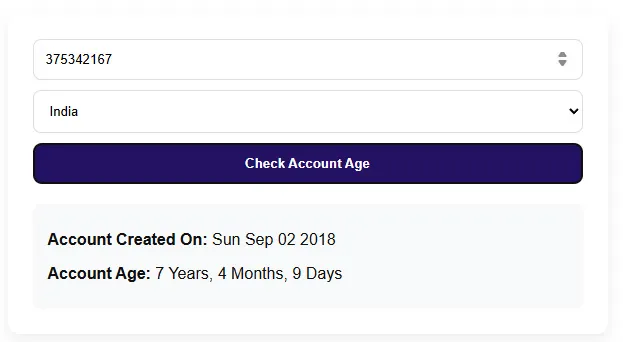
Our team at Free Fire Nation has developed a specialized tool that uses your Player UID to estimate your account’s creation period. Since Garena assigns UIDs chronologically, we can cross-reference your ID with our database of account milestones.
How to use it:
-
Go to the Free Fire Account Age Checker.
-
Enter your Free Fire UID (the 8-10 digit number found in your profile).
-
Click “Check.”
-
The tool will provide an estimated timeframe of when your account was born.
Note: This is the fastest method if you don’t have access to your original social media accounts or emails.
Method 2: Check Your Social Media Links (Facebook/Google)
Most Free Fire players link their accounts to Facebook, Google, or VK to save progress. These platforms keep a record of exactly when you “authorized” Garena Free Fire to access your data.
For Facebook Users:
This is the most accurate native method.
-
Open your Facebook App and go to Settings & Privacy.
-
Select Settings.
-
Scroll down to the “Your Activity” section and click on Apps and Websites.
-
Find Garena Free Fire in the list.
-
Click on it, and look for the “Added on” date.
-
Pro Tip: This is almost always the exact day you first logged into Free Fire using that Facebook account.
-
For Google/Gmail Users:
-
Open your Gmail account associated with Free Fire Account Age Checker.
-
Search for “Garena,” “Free Fire,” or “Welcome.”
-
Look for the oldest email received from Garena.
-
Alternatively, go to your Google Account Settings > Security > Third-party apps with account access. While it might not show the exact date, it confirms when the connection was established.
Method 3: The Google Play Store / Apple App Store History
If you downloaded Free Fire on your current device or have stayed within the same ecosystem (Android or iOS), your app store history is a goldmine of information.
On Android:
-
Open the Google Play Store.
-
Tap your profile icon and go to Manage apps & device.
-
Go to the Manage tab and change the filter from “Installed” to “Not Installed” (if you’ve ever deleted it) or simply look at your download history.
-
For a more precise date, go to Google Play Games app > Profile > Achievements. Look for the date of your very first Free Fire achievement (like “First Blood” or “Level 5”).
On iOS:
-
Open the App Store and tap your profile picture.
-
Click on Purchased.
-
Scroll down (it might take a while if you download many apps!) until you find Free Fire. The “Purchase” date listed is when you first downloaded the game.
Method 4: Analyzing Your In-Game Progression
If the technical methods above don’t work, you can play detective using your own inventory.
1. Check Your Oldest Elite Pass/Booyah Pass: Go to your badge history. Which was the first season you earned badges in? If you have badges from Season 1 (The Sakura Era), your account dates back to mid-2018.
2. Look for “Veteran” Rewards: Garena often gives out rewards for anniversaries. Do you have a “1st Anniversary” backpack or skin? If so, you were active during August 2018.
3. UID Length: While not an exact science, the length and starting digits of your UID are huge clues:
-
8-digit UIDs: Usually created in late 2017 or early 2018.
-
9-digit UIDs: Created between 2019 and 2021.
-
10-digit UIDs: Created in the last few years.
E-E-A-T Insight: Why You Can Trust Free Fire Nation
As long-time players and community contributors, we understand that account security is paramount. When using tools or searching for account info, never share your password.
Our tool at Free Fire Nation only requires your Public UID. We built these resources because we’ve been through the frustration of trying to recover an old account and not knowing the “creation date.” We are dedicated to providing the Free Fire community with accurate, safe, and helpful technical data.
How to Protect Your “Aged” Account
Once you realize how old (and valuable) your account is, you’ll want to protect it. Older accounts are prime targets for hackers.
-
Enable 2FA: Whether it’s Google or Facebook, ensure Two-Factor Authentication is ON.
-
Screenshot Your Profile: Take a screenshot of your UID and your “Gallery” page today. If you ever need to contact Garena, this is your evidence.
-
Link Multiple Logins: If possible, ensure your account is linked to a secondary platform so you don’t lose access if one social media account gets banned.
Frequently Asked Questions (FAQ)
Q: Can I change my Free Fire account creation date? A: No. The creation date is a permanent record on Garena’s servers and cannot be modified.
Q: Does my age reset if I delete the game? A: No. As long as you don’t “Delete Account” in the settings, your start date remains the same from the moment you first linked it to a social media platform.
Q: Can Garena Support tell me my exact account age? A: Usually, Garena Support will not provide this information to you. They use it as a verification question for you. This is why using our checker tool or Facebook settings is so important.
Q: Why does my UID start with a different number than my friend’s? A: UIDs are often assigned based on the region (Server) you are playing in (India, Brazil, Indonesia, etc.) and the time of account creation.
Conclusion
Finding your Free Fire account age is a journey down memory lane. It reminds you of the old Bermuda map, the first time you drove a Jeep, and the evolution of the game into the global powerhouse it is today.
Whether you’re using our Account Age Checker for a quick answer or digging through your Facebook settings for the exact day and hour, knowing your start date is essential for any serious survivor.