
How to Contact Free Fire Support in 2026 — The Right Portal for Every Problem
If you’ve ever submitted a ticket to Free Fire support and heard nothing back for two weeks, you probably used the wrong regional portal. Garena splits its customer service infrastructure by geography — and your ticket gets silently routed to the wrong queue if you don’t land on the right URL first. This guide maps every use case to the exact support path, form fields, evidence you need, and realistic timelines. No guesswork, no third-party middlemen.
The One Rule Before You Contact Anyone
There is no Free Fire customer support phone number. None exists. Garena does not operate through WhatsApp, Telegram, Discord, or YouTube comments. Any account that claims to be “Official FF Support” on social media and asks for your password, your UID, or any payment is a scam. Every legitimate interaction happens through the portals listed below — that’s it.
Common Mistake: Dozens of players every day submit their sensitive account details to fake “Garena support” Telegram channels that appear in search results. Real Garena support never DMs you first, never asks for your login password, and never charges a fee for account recovery.
Which Regional Portal Is Yours? (Start Here)
Garena operates separate regional customer service teams, and players need to contact the team assigned to their specific server. Garena Free Fire Using the global portal when you’re on the India server, for example, often means your ticket reaches a team that can’t actually pull your server data.
| Your Server / Region | Official Support Portal |
|---|---|
| India (Free Fire MAX India) | ffsupportind.garena.com |
| Bangladesh | ffsupportbd.garena.com |
| Pakistan | ffsupportpk.garena.com |
| Middle East & North Africa | mena.ff.support.garena.com |
| Global / All other regions | ffsupport.garena.com |
| General Garena Account issues | help.garena.com |
If you’re not sure which server you’re on, open Free Fire → tap your profile icon → your UID’s server region shows in the account details. India UIDs typically fall under the IND portal; Southeast Asia players outside those specific regions use the global portal.
Quick Note: As of April 2026, the India portal (ffsupportind.garena.com) handles both English and Hindi-language queries. All other portals operate in English only.
How to Submit a Support Ticket — Step by Step
This process is the same across all regional portals. The interface runs on Zendesk, so once you’ve seen it once, every portal works identically.
Step 1: Open your regional portal URL in a browser — the in-game “Customer Service” shortcut (Settings → Basic → Customer Service) works too, though the browser version lets you attach larger video files.
Step 2: Tap or click Sign In in the top-right corner. Use the same login method your Free Fire account is linked to — Facebook, Google, VK, Apple, or Huawei. If you sign in with a different account than the one you’re reporting, your ticket gets auto-rejected. Submitting a request from an unlinked account leads to automatic rejection. HL GAMING OFFICIAL
Step 3: After login, your in-game nickname and UID are pre-filled. Click Submit a Request.
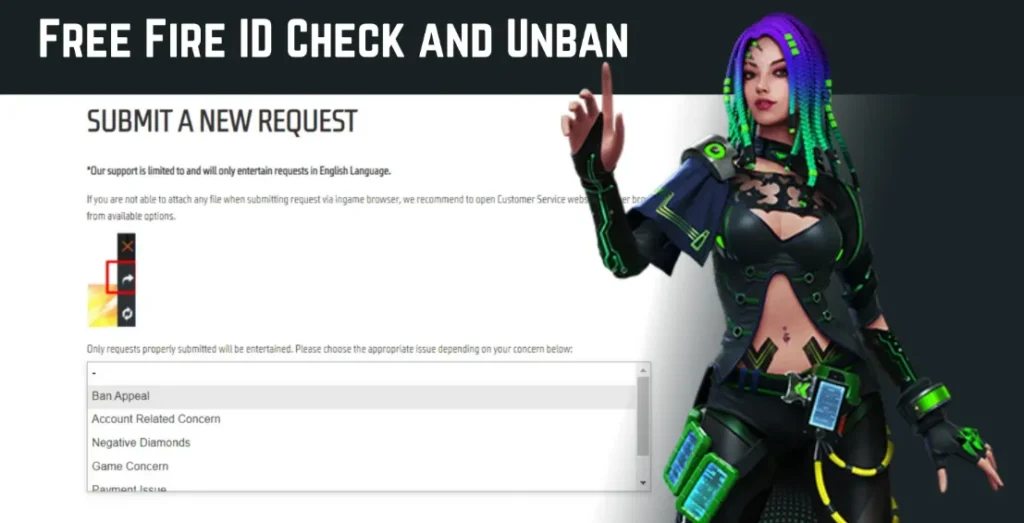
Step 4: Select your issue category from the dropdown. This step matters more than most players realise — selecting the wrong category, like picking “Game Concerns” when you have a payment issue, pushes your ticket to the back of a different queue entirely. Free Fire India FC
Step 5: Fill in the description, attach your evidence files, and hit Submit. Note down your ticket number — you’ll need it to track the response or follow up.
Step 6: Check the email address linked to your account. All responses go there, not back into the game.
Pro Tip: The web browser version of the support portal lets you upload videos and high-resolution screenshots without file-size restrictions that the in-game browser sometimes imposes. If you have gameplay footage as evidence, use the browser.
Use Case 1 — Account Hacked or Locked Out
Someone changed your linked email or social login. You can’t get back in. This is urgent, and the clock matters because the longer you wait, the more in-game items can be transferred or spent.
What to select: Account Security Issue → Account Hacked / Compromised
Evidence that actually moves your ticket:
- Your oldest diamond top-up receipt (screenshot or PDF). Account security issues get priority handling because they involve potential data theft. Free Fire India FC
- Screenshot of your player profile (from a friend’s account showing your UID and name)
- The email or phone number previously linked to the account
- Date of last successful login, if you remember it
Realistic timeline: 3–5 business days for initial response. During major update weeks or tournament seasons, expect 5–7 days.
What won’t work: Telling support “my friend can vouch for me” or submitting a ticket without any ownership evidence. They handle thousands of these daily. Proof of purchase is your single strongest claim.
Use Case 2 — Account Banned (False Positive or Appeal)
Seeing “There are abnormal activities with your account. It has been suspended” is the most common reason players reach out to support. False-positive cheat flags and hacked accounts have the best reversal rate among all ban appeal types. Unbanster
What to select: Account Ban → Submit a Request → Ban Appeal
Evidence checklist:
- Screenshot of the ban notification screen
- Your Free Fire UID and in-game nickname (exact)
- Timestamp of when the ban appeared
- Unedited gameplay footage from the flagged match if you have it
- A clean antivirus or Play Protect scan of your device (saves many false-positive cases)
Average Garena reply time for ban appeals is 3–5 business days. Unbanster Permanent bans for confirmed cheating are almost never reversed — Garena’s policy is zero tolerance. If the appeal is for a false positive, be specific about why: mention if you used an emulator, a VPN, or logged in from a new device, because those can trigger automated flags even on clean accounts.
Common Mistake: Submitting two or three tickets for the same ban. Duplicate submissions reset your queue position Unbanster, meaning you start waiting again from zero. One ticket, one appeal. Follow up only after 7+ days of silence.
For a detailed breakdown of the full unban process, check out our Free Fire account unban guide on FreeFireNation.
Use Case 3 — Diamonds Purchased But Not Received
Your bank statement shows the deduction. Your in-game diamond balance shows nothing changed. Here’s the process that actually resolves this.
What to select: Payment Issue → Diamonds Not Received
Wait 24 hours first. Peak event hours and flash sales cause temporary server lag in payment processing. Raising a ticket before the 24-hour window often results in support asking you to wait anyway, adding a day to your resolution time.
After 24 hours: Submit a ticket under “Payment Issue” and include the exact GPA Order Number from the automated receipt email Google or Apple sent you. That order number is what lets the support team trace your specific transaction in their payment database. Free Fire India FC
Critical warning: Never request a refund directly through Google Play or Apple App Store for a Free Fire diamond purchase. This results in a “Negative Diamond” balance and your account gets restricted until the debt is paid. freefirenation Always go through the Garena portal first.
Top-up platform note: If you bought through Codashop or Games Kharido instead of directly through the app store, contact that platform’s support first — they hold the transaction record and can provide Garena with the proof needed. See our Codashop vs Games Kharido comparison for which platform tends to resolve these faster.
Use Case 4 — Lost Guest Account
This one is brutal. Guest accounts live on your device’s local storage, not Garena’s servers. Delete the app, factory reset your phone, or clear your app data — and the account is gone from Garena’s side.
The honest answer: Garena support can rarely recover guest accounts. The data is stored on your device’s internal memory, not Garena’s servers. freefirenation If you have the com.garena.msdk folder backed up in your phone’s file manager from before the loss, there’s a small chance a device-level restore works. Otherwise, the ticket is worth submitting under “Account Loss → Guest Account,” but set realistic expectations.
The real fix going forward: Bind any account immediately. Open Free Fire → Profile → Account Binding → link to Google or Facebook. Takes 30 seconds. Do it before you grind anything worth keeping.
Use Case 5 — Reporting a Bug or Technical Issue
Crashes, black screens, lag spikes that only hit one server, features not loading after an update — these go through a different category than account issues.
What to select: Game / Technical Issue → [specific sub-type]
Include your device model, Android/iOS version, Free Fire version number (visible in Settings), and the exact time the issue occurred. Screenshots or screen recordings attached to the ticket move these to the right team significantly faster than text descriptions alone.
Garena uses bug reports to identify widespread issues — the more detail you provide, the more useful your ticket is even if it doesn’t get an individual response.
Pro Tip: If the bug affects your ranked progress (lost a match due to a server crash, for example), note your match ID from the post-game screen. That ID lets support verify the specific session on their end.
Use Case 6 — Reporting Another Player for Hacking
You don’t need the support portal for this. The fastest method is in-game: open the match results screen → tap the suspected player’s name → Report → select the violation type. In-game reports feed directly into Garena’s Anti-Hack system.
If you have video evidence of cheating and want to escalate beyond the in-game report, you can submit a ticket under “Report a Player” and attach the footage. These tickets don’t get individual responses, but they do get reviewed — especially when a UID accumulates multiple reports with video evidence attached.
Use Case 7 — Security Vulnerability Disclosure
This one almost no guide mentions. If you’ve found a security exploit, a data vulnerability, or an account-level bug that could harm other players, Garena has a dedicated channel: ffsecurity@garena.com. This is separate from normal player support and goes to their security team directly. Do not post exploit details publicly before reporting — that protects you and other players.
What Information to Always Have Ready
Before you open any support ticket, gather these. Having them ready cuts your resolution time significantly:
Your Free Fire UID (visible bottom-left of your profile screen), your in-game nickname, the server/region your account is on, the platform your account is linked to (Google, Facebook, etc.), and the approximate date the issue started.
For payment issues, also have your transaction/order ID (starts with GPA for Google Play purchases). For ban appeals, have a screenshot of the ban notification. For hacked accounts, have your first top-up receipt.
Frequently Asked Questions
How long does Free Fire support take to reply?
Standard tickets — including ban appeals and payment disputes — typically receive a first response within 3–5 business days. During major patch launches, global tournaments, or peak event periods like Ramadan or New Year, response times can stretch to 7–10 business days. Check your registered email, including spam folders.
Can I contact Free Fire support if I use a guest account?
You can submit a ticket, but guest account recovery is extremely limited. Garena’s systems don’t store guest account data server-side. The only realistic path is a file-level restore from the com.garena.msdk folder if you have a backup. Binding to Google or Facebook immediately prevents this situation entirely.
Does Free Fire have a support email address or phone number?
Garena Free Fire phone numbers are not available as a contact method. Garena Free Fire There is no general player support email either. All player support goes through the regional portal’s ticket system. The only email address that exists for players is ffsecurity@garena.com — which is specifically for reporting security vulnerabilities, not account or billing issues.
What happens if my ticket gets no response after 10 days?
Log back into your regional portal, find your ticket under “My Requests,” and submit a polite follow-up comment on the same ticket. Don’t open a new ticket for the same issue — that resets the queue. If you’ve followed up twice with no response and it’s been over 14 days, try reaching out through Garena’s official social channels (their verified Facebook or Twitter/X pages) with your ticket number. They can sometimes flag stuck tickets internally.
Is there a faster way to contact Free Fire support in India?
Contact Free Fire Support
For India players, there’s an in-game option post-relaunch: Open Free Fire → Settings → Help Center. This form prioritises the India server and may process faster than the web portal for common issues like payment failures and login errors.
The fastest resolution in any support case comes down to two things: the right regional portal and complete evidence attached on the first submission. Players who submit vague tickets and then follow up repeatedly end up waiting the longest. Hit the correct portal from the table above, match your use case to the right category, attach everything upfront — and Garena’s team generally resolves legitimate cases within a week.
Got a specific issue not covered here? Drop it in the comments and we’ll point you to the right path.
Read Next: