
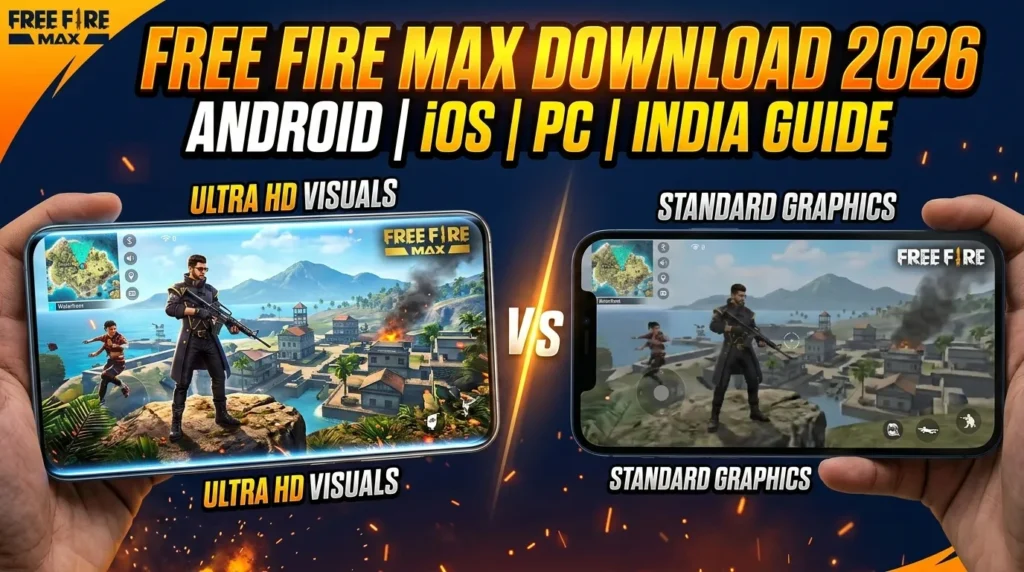
Free Fire MAX Download APK 2026 — Android, iOS, PC & India Complete Guide
If you’re in India and playing Free Fire, here’s something worth knowing straight away: Free Fire MAX isn’t just the “better-looking” version anymore. Since the original Free Fire was banned in India in February 2022, Free Fire MAX is Free Fire in India. Every Indian tournament, every collaboration, every competitive event — all of it now runs on Free Fire MAX. It’s not an upgrade. It’s the game.
This is the complete 2026 download guide. Whether you’re on Android, iOS, PC via emulator, or hunting for the APK specifically — this page covers every method, every requirement, every common installation problem, and what you actually get when you install Free Fire MAX versus what you might expect.
No fake APK links. No unofficial downloads. Just the real thing.

What Is Free Fire MAX — And Why Does It Matter in 2026?
Free Fire MAX is Garena’s enhanced version of the original Free Fire battle royale game. Same 50-player island, same 10-minute matches, same guns, characters, and maps — but with significantly better visuals, sharper textures, smoother animations, and upgraded audio.
The technology that makes it work alongside the original is called Firelink — a sync system that connects Free Fire MAX and regular Free Fire players in the same matches. Your account, inventory, skins, diamonds, and rank are shared across both versions. You can switch between them without losing a single item.
Here’s what actually changed in the MAX version compared to standard Free Fire:
- Ultra HD resolution on supported devices (up to 60fps on high-end phones)
- Dynamic lighting that shifts across the map with time-of-day changes
- More detailed character models and weapon textures
- Enhanced explosion and gunfire particle effects
- Directional audio improvements — footsteps are more precise, gunshots feel weightier
- Craftland mode — exclusive to Free Fire MAX, lets players create and share custom maps
- Bermuda MAX — a visually upgraded version of the classic Bermuda map
For players in India specifically, there’s one more reason Free Fire MAX matters: it’s the only officially available, fully legal version of the game. The original Free Fire app remains unavailable on the Indian Play Store as of March 2026.
Pro Tip: Free Fire MAX and regular Free Fire share the same matchmaking pool thanks to Firelink. If your squad has friends on lower-end devices running standard Free Fire, you can still play together seamlessly — no split player base.
Free Fire MAX Latest Version (March 2026)
Before you download anything, here are the current version details:
| Detail | Information |
|---|---|
| Latest Version | 2.120.1 |
| Release Date | January 14–15, 2026 |
| APK Package Name | com.dts.freefiremax |
| APK File Size | ~95MB (base APK) |
| Full Install Size (with OBB) | ~370–400MB total |
| Developer | Garena International I |
| Rated | Teen (13+) |
| Platforms | Android, iOS |
Why two different sizes? The base APK file you download is around 95MB. After installation, the game automatically downloads OBB data (additional game files — maps, textures, audio) which brings the full install to roughly 370–400MB on your device. Download this over WiFi — you don’t want that hitting your mobile data.
Method 1: Download Free Fire MAX on Android (Google Play Store — Recommended)

This is the safest, simplest method for the vast majority of players. If your device has the Play Store, use it.
Step 1: Open the Google Play Store on your Android device.
Step 2: Tap the search bar and type “Free Fire MAX” — make sure you select the result by Garena International I (the verified developer badge will be visible).
Step 3: Tap Install. The base APK will download first (~95MB), then the app will launch and automatically download the OBB game data. Keep it connected to WiFi through this entire process.
Step 4: Once installation completes, open the game. You’ll be prompted to log in — use the same Facebook or Google account linked to your existing Free Fire account. Your progress, skins, and diamonds will all be there.
Step 5: Go to Settings → Graphics inside the game and choose your graphics quality based on your device. Start at Medium if you’re unsure — you can always go higher later.
That’s it. No enabling unknown sources, no manual OBB placement, no extra steps. Play Store handles everything.
Method 2: Download Free Fire MAX APK (Manual Install for Android)

Some players need the APK method — most commonly because:
- Their device’s Play Store is restricted or unavailable in their region
- They want to install a specific version of the game
- They’re testing on a secondary device without a Google account
If this is you, here’s the only safe way to do it:
The only APK source we recommend cross-referencing is the official Garena website at ff.garena.com, which sometimes hosts direct APK downloads during special circumstances (such as game launches in new regions). For ongoing APK access, established Android repositories like APKPure maintain the package ID com.dts.freefiremax — verify this package name matches before installing anything.
How to install an APK manually:
Step 1: Download the APK file to your device. (Base APK: ~95MB)
Step 2: Go to Settings → Security (or Privacy on newer Android versions) and enable “Install from Unknown Sources” — or when prompted during installation, allow your browser/file manager to install unknown apps.
Step 3: Open your file manager, locate the downloaded APK, and tap it to install.
Step 4: Once installed, open Free Fire MAX. The app will detect it needs the OBB data and begin downloading it automatically (requires an internet connection). Do not close the app during this phase.
Step 5: Log in with your account credentials once the download completes.
Critical Warning: Do not download Free Fire MAX APKs from random websites, Telegram channels claiming “unlimited diamonds versions,” or any source other than verified app repositories or Garena’s official site. Modified APKs — even ones that look identical to the real game — can contain credential-harvesting code, trigger Garena’s anti-cheat system, or install background malware. The package ID of the real Free Fire MAX is com.dts.freefiremax — verify this before installing any APK.
Method 3: Download Free Fire MAX on iOS (iPhone & iPad)
Free Fire MAX is available on iOS with some regional variations.
Step 1: Open the App Store on your iPhone or iPad.
Step 2: Search “Free Fire MAX” and select the result from Garena International I.
Step 3: Tap Get and authenticate with Face ID, Touch ID, or your Apple ID password.
Step 4: Wait for the download and installation to complete — total size is similar to Android at around 370–400MB.
Step 5: Open the game and sign in with the Facebook or Google account linked to your Free Fire account.
iOS-specific note: Not all regions have Free Fire MAX available on the App Store. If you’re in a region where it doesn’t appear in search results, you may need to switch your App Store region to a supported country — this is done through your Apple ID settings. Indian players: Free Fire MAX is available on the Indian App Store as of 2026.
iOS device minimum specs for Free Fire MAX:
- iPhone 6s or newer
- iOS 11.0 or later
- At least 1GB free storage (game will expand to ~400MB after OBB download)
iPhone 11 and above will run Free Fire MAX at high graphics settings smoothly. iPhone 6s and 7 can run it but expect lower frame rates at medium settings.
Method 4: Download Free Fire MAX on PC (Emulator)
Free Fire MAX doesn’t have a native PC version, but it runs well through Android emulators. This is popular for players who prefer keyboard/mouse controls and a bigger screen.
Recommended emulators:
BlueStacks 5 — Most widely used, has Free Fire MAX keymapping built in, runs well on mid-range PCs. Download from bluestacks.com only.
GameLoop — Tencent’s emulator, also supports Free Fire MAX well. Download from gameloop.com only.
LDPlayer — Lighter on system resources than BlueStacks, good option for older PCs.
PC minimum requirements for running Free Fire MAX via emulator:
| Requirement | Minimum | Recommended |
|---|---|---|
| OS | Windows 7 (64-bit) | Windows 10/11 |
| RAM | 4GB | 8GB or more |
| Storage | 10GB free | 20GB free |
| Graphics | DirectX 11 compatible | Dedicated GPU (GTX 750 or better) |
| Processor | Intel Core i3 / AMD equivalent | Intel Core i5 or better |
Installation steps for PC (BlueStacks example):
- Download and install BlueStacks from bluestacks.com
- Sign in with a Google account inside BlueStacks
- Open the Play Store within BlueStacks
- Search “Free Fire MAX” and install normally
- Configure your keymapping (BlueStacks has Free Fire MAX presets)
- Log in with your Free Fire account and play
One thing worth knowing: Garena monitors connection patterns. Playing on emulators is common and generally accepted, but use it legitimately — don’t combine emulator play with VPNs or other tools that make your connection look unusual.
System Requirements for Free Fire MAX (Android)
This is where many players make a mistake — installing Free Fire MAX on a device that struggles to run it, then blaming the game for lag. The issue is almost always hardware.
Minimum requirements:
- Android 5.0 or higher
- 2GB RAM
- ~400MB free storage (after full install)
- Stable internet connection (mobile data or WiFi)
Recommended for smooth gameplay:
- Android 8.0 or higher
- 4GB RAM or more
- 1.5GB+ free storage (for updates)
- Snapdragon 660 / MediaTek Helio G85 or better processor
For Ultra HD graphics:
- Android 10 or higher
- 6GB RAM or more
- Snapdragon 730G / Dimensity 700 or better
If your device has only 2GB RAM, Free Fire MAX will work but expect performance to degrade in busy match scenarios — like when you drop hot into Clock Tower with three squads and every gloo wall and explosion is rendering simultaneously. On 3GB RAM, the experience is noticeably smoother. On 4GB and above, you’re running it the way Garena intended.
Common Mistake: Running Free Fire MAX with too many background apps open. Even on 4GB RAM devices, having Chrome, YouTube, WhatsApp, and other apps running in the background while gaming will cause stuttering. Close everything before launching the game — your ping and frame rate will both improve.
For device recommendations by budget, our guide on best phones for Free Fire under ₹10,000 covers exactly which devices run Free Fire MAX well without breaking the bank.
Free Fire MAX in India — What You Need to Know in 2026
This section is specifically for Indian players, because the situation here is different from the rest of the world.
Original Free Fire is banned in India. The Government of India banned Garena Free Fire on February 14, 2022, under Section 69A of the IT Act — the same order that banned dozens of Chinese-origin apps over data privacy and national security concerns. The original Free Fire app is not available on the Indian Play Store and cannot be officially downloaded.
Free Fire MAX is the legal version for India. It has been available on the Indian Play Store and App Store continuously since the ban. All Indian competitive events — including the Free Fire MAX India Cup, regional leagues, and Garena’s collaborations with Indian brands — now operate on Free Fire MAX.
Free Fire India was announced but never launched. Garena announced a dedicated “Free Fire India” version with a planned India-exclusive server and localized content. The launch was halted the day before it was set to go live, and as of March 2026, the project appears to have been shelved entirely. Free Fire MAX has effectively become “Free Fire India” in practice — all Indian community events run on it.
What this means for Indian players downloading the game:
- Go to the Play Store, search “Free Fire MAX,” and install. It’s fully available.
- Your existing account (if you had one before the ban and linked it to Facebook/Google) may still be recoverable.
- All redeem codes, events, and rewards you see on sites like FreeFireNation.com’s daily codes page work in Free Fire MAX.
Free Fire MAX vs Free Fire — Which Should You Download?
If you have a choice between the two (i.e., you’re outside India), here’s how to decide in 30 seconds:
Download Free Fire MAX if:
- Your device has 3GB RAM or more
- You want better graphics and smoother animations
- You want access to Craftland mode
- You’re in India (it’s your only legal option)
Stick with regular Free Fire if:
- Your device has 2GB RAM or less and struggles with heat during gaming
- Storage is severely limited on your device
- You specifically prefer lighter visuals for competitive visibility
The core gameplay, matchmaking, rank system, characters, weapons, events, and your account are 100% identical across both versions. The only real differences are visual quality, audio enhancement, and Craftland. Your squad can mix both versions and still play together in the same lobby — Firelink handles that.
For a full breakdown of every difference, check our Free Fire vs Free Fire MAX comparison guide.
Common Free Fire MAX Download & Installation Problems (And Fixes)
“Device not compatible” on Play Store
Your device doesn’t meet the minimum Android version (5.0) or screen resolution requirements. If your phone is very old, you may need the APK method — but manage expectations about performance.
Installation stuck at 0% or fails repeatedly
Almost always a storage issue. Free Fire MAX needs roughly 400MB of clean storage, but Android also needs working space to unpack files during installation. Have at least 1GB free before attempting the install, not just 400MB.
OBB download fails after APK installs
This happens when your internet drops during the post-install OBB download. Go to a stable WiFi connection, open the game again, and it will resume from where it stopped. Don’t uninstall and reinstall — you’ll just have to download the OBB again from scratch.
Game crashes on launch
Check if your device meets minimum requirements (2GB RAM, Android 5.0+). If it does, try clearing the app cache: Settings → Apps → Free Fire MAX → Clear Cache. If crashes persist, lower your graphics settings to Low immediately after a successful launch before the crash occurs.
Login failed / can’t connect to account
Make sure you’re using the correct Facebook or Google account — the same one linked to your Free Fire account. If you linked with Facebook and try to log in with Google, you won’t find your account. Try both options if you’re unsure which one you originally used.
Free Fire MAX Graphics Settings — Quick Setup by Device Tier
Once you’ve installed and logged in, configure your graphics before your first match. Here’s a quick starting point:
Budget devices (2–3GB RAM, Helio G35 class):
- Graphics: Low
- Frame Rate: Low (30fps)
- Anti-aliasing: Off
- These settings prioritize stability over looks — correct choice for these devices
Mid-range devices (4GB RAM, Helio G85 / Snapdragon 665):
- Graphics: Medium
- Frame Rate: Medium (45fps)
- Anti-aliasing: Off or Low
- Balanced visual quality without overheating during long sessions
High-end devices (6GB+ RAM, Snapdragon 730G and above):
- Graphics: High or Ultra
- Frame Rate: High (60fps)
- Anti-aliasing: Low or Medium
- This is where Free Fire MAX actually looks like a different game
For competitive ranked play, many Heroic and Grandmaster players actually dial graphics back to Medium even on powerful phones — fewer visual effects means slightly easier enemy spotting in some scenarios. This is a personal preference call, not a universal rule.
To go deeper on optimizing your device for headshots and ranked performance, our best sensitivity settings guide has the full setup.
Frequently Asked Questions
Is Free Fire MAX free to download?
Yes. Free Fire MAX is free to download and play on Android, iOS, and PC via emulator. The game is free-to-play with optional in-game purchases — you can buy diamonds for cosmetics (skins, characters, bundles), but no gameplay-affecting items require payment. Skill determines outcomes, not spending.
Can I use my existing Free Fire account on Free Fire MAX?
Yes. Log in with the same Facebook or Google account linked to your Free Fire account. All your progress, rank, diamonds, skins, characters, and pets will be there via Firelink synchronization. Nothing is lost when switching between versions.
Is Free Fire MAX available in India?
Yes. Free Fire MAX is fully available on the Indian Google Play Store and Apple App Store as of 2026. The original Free Fire app remains banned in India, but Free Fire MAX is completely legal and officially available. It is the only version Indian players can access through official channels.
What is the file size of Free Fire MAX APK in 2026?
The latest version (2.120.1) has a base APK size of approximately 95MB. After installation, the game downloads additional OBB data bringing the total install size to roughly 370–400MB. Download on WiFi to avoid large mobile data charges.
Does Free Fire MAX work on low-end phones?
It can run on 2GB RAM devices with Android 5.0 or higher, but the experience on low-end phones is noticeably different from mid-range and above. Frame drops, occasional lag, and heating are common on entry-level hardware. If your device struggles, try the original Free Fire (outside India) or reduce all graphics settings to Low inside Free Fire MAX.
Can I play Free Fire MAX on PC?
Yes, through Android emulators like BlueStacks, GameLoop, or LDPlayer. Your PC needs a minimum of 4GB RAM and a DirectX 11 compatible graphics card. Full step-by-step PC setup instructions are included in the guide above.
Final Word — Just Download the Real Thing
Free Fire MAX is the #1 mobile battle royale in India for good reason. It runs on most phones, the matches are fast and intense, every OB update brings new content, and for Indian players — it’s the only game in town officially.
The download process is simple: Play Store → search “Free Fire MAX” → install → log in. If you’ve been putting it off because you weren’t sure which version to get or how the whole thing works, now you know. Everything your old Free Fire account had is waiting for you.
Once you’re in, grab today’s active Free Fire redeem codes before they expire — free diamonds, weapon skins, and character trial cards are updated daily. And if you’re serious about ranked, check out the Free Fire Advance Server guide to get early access to the next OB patch before it drops for everyone else.
Booyah awaits.
Last updated: March 2026 | Based on Free Fire MAX version 2.120.1 (OB52 patch cycle). File sizes and system requirements may change with future OB updates. Always download from official sources: Google Play Store, Apple App Store, or ff.garena.com.